There are two common reasons why tasks may not be visible to volunteers:
1. Tasks are hidden in the event settings
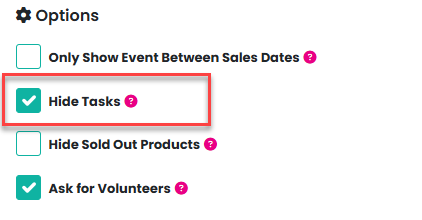
The Hide Tasks option may be enabled for the event. To review this:
Go to Admin > Events
Open the Manage menu for the relevant event and select Edit
Ensure the Hide Tasks checkbox is unchecked
2. The tasks required by date has passed
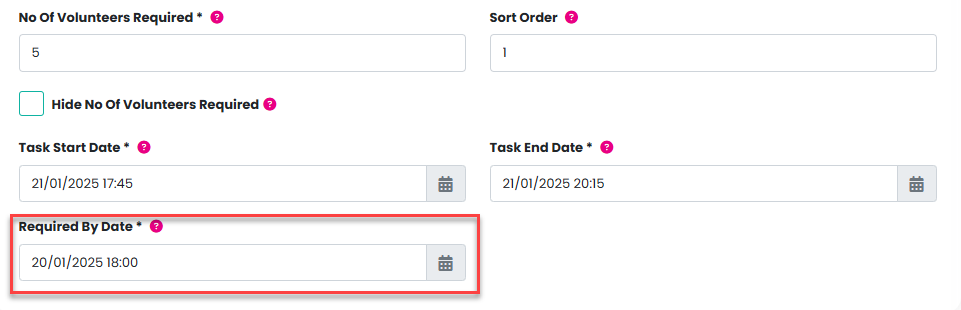
Tasks will not appear if their required by date is set in the past.
To review this:
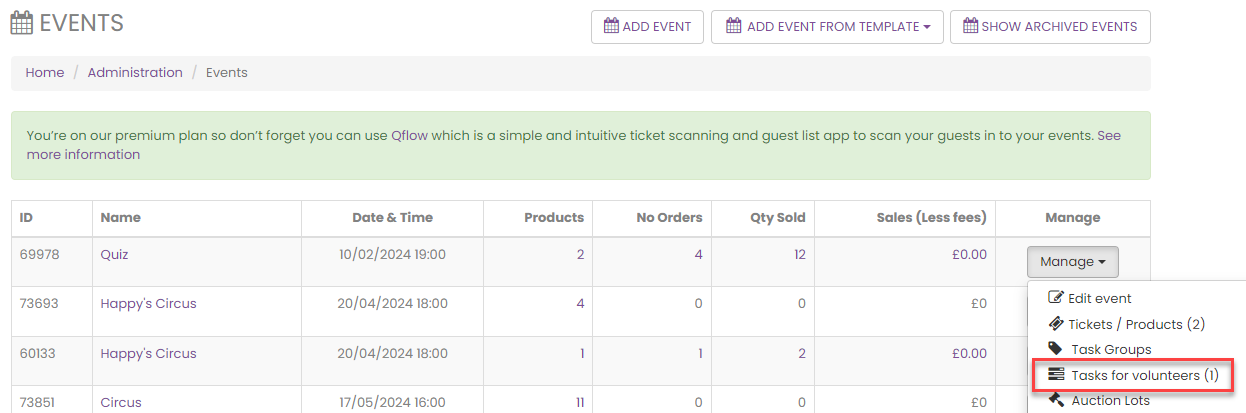
Open the event’s Manage menu and select Tasks for Volunteers
Locate the relevant task, open the Manage menu, and select Edit
Check and update the required-by date if necessary
Once these settings are corrected, the tasks should be visible to volunteers again.
If you require further support please email support@pta-events.co.uk and the team will be happy to help.
Was this article helpful?
That’s Great!
Thank you for your feedback
Sorry! We couldn't be helpful
Thank you for your feedback
Feedback sent
We appreciate your effort and will try to fix the article