For security reasons, passwords are not stored in plain text. This means we’re unable to view or remind you of your existing password. If you’ve forgotten it, you’ll need to request a password reset.
To reset your password:
Visit the PTA Events website.
Click Login.
Beneath the login form, select Forgot Password?
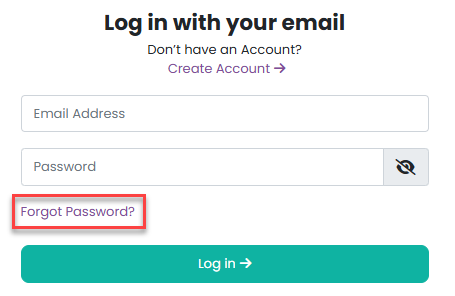
4. Enter your email address and click Request password reset
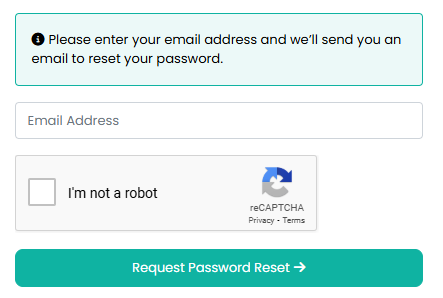
If your email address is registered on the website, you’ll receive a password reset email. This email will contain a secure link, which must be used within 2 hours. Please remember to check your Junk/Spam folder if the email doesn’t appear in your inbox.
Once you click the link, you’ll be able to create a new password.
Please note: If the email address you enter is not registered on the website, no password reset email will be sent.
Click here for further information if your customer has not received a password reset request.
Was this article helpful?
That’s Great!
Thank you for your feedback
Sorry! We couldn't be helpful
Thank you for your feedback
Feedback sent
We appreciate your effort and will try to fix the article