If your circumstances have changed or you selected the wrong business type when setting up your Stripe account, you can update this directly in Stripe.
Log in to your Stripe account.
Go to Settings > Taxation, or visit:
https://dashboard.stripe.com/settings/taxationFrom the Type of business dropdown menu, select the correct option.
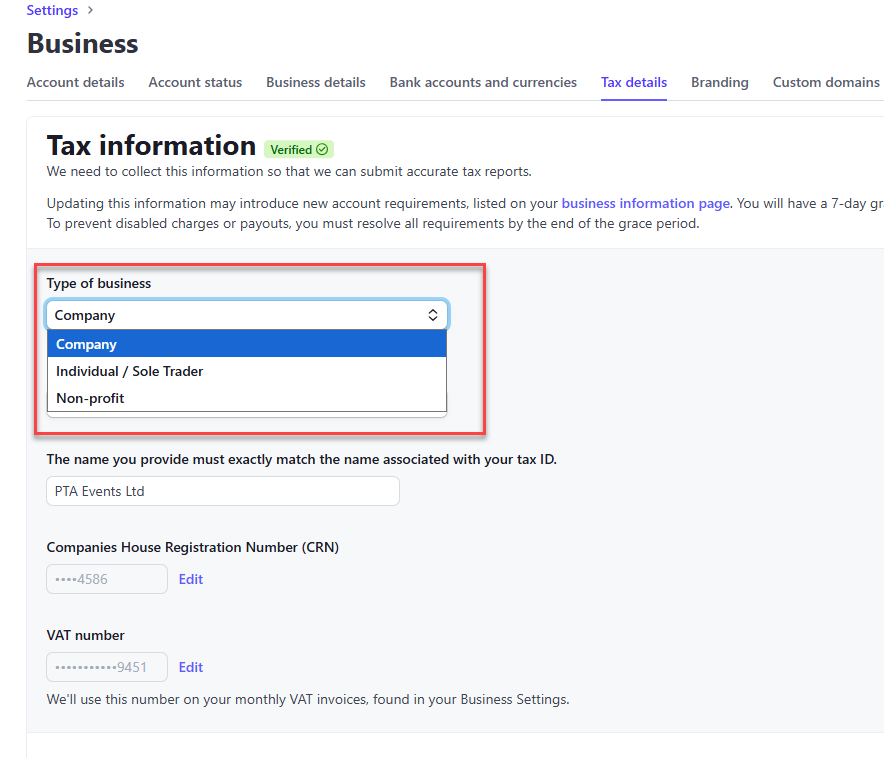
Important: If you are not a registered charity, we recommend selecting Individual / Sole Trader. The other business types require official business verification documents, which may not be applicable to your organisation.
You can contact Stripe support directly for further information:
Stripe Login | Sign in to the Stripe Dashboard
Was this article helpful?
That’s Great!
Thank you for your feedback
Sorry! We couldn't be helpful
Thank you for your feedback
Feedback sent
We appreciate your effort and will try to fix the article