An account is anywhere your money sits, not just the bank. Add one for each of your current account, any savings account, the cash float, and money taken by card that has not been paid out to you yet.
How do I add an account?
- Go to Finances > Bank Accounts
- Open the Manage menu and choose Add Account

3. Fill in the details and click on the Add button
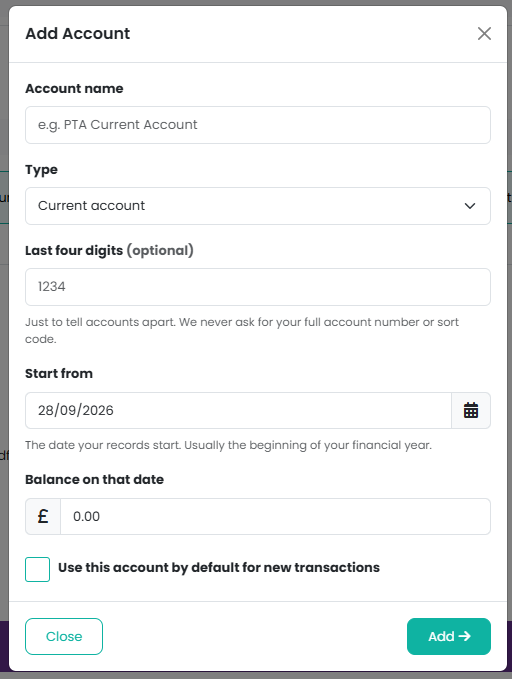
What do the fields mean?
- Account name - how you refer to it, for example "Barclays current account" or "Cash tin".
- Type - Current account, Savings account, Cash, or Held by payment provider. Choose Cash for money you keep out of the bank, such as event floats or a cash tin. Money gets into and out of a cash account with Move Money Between Accounts in the Manage menu, and cash takings and costs are recorded against it like any other account.
- Last four digits - optional, and only ever four digits. It is there to tell two similar accounts apart. We never ask for a full account number or sort code.
- Start from - the date you want your records to begin.
- Balance on that date - what the account held on that day. This is the opening balance. It can be negative if the account was overdrawn.
- Use this account by default for new transactions - the one suggested first when you record something. Most organisations make their current account the default. Stripe payouts are also posted to the default account.
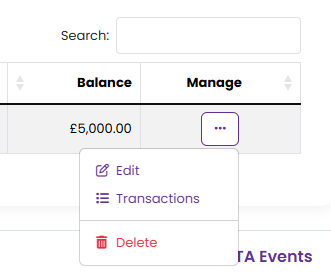
What can I do from the Manage menu of each account?
Each account has a menu with Edit, Transactions (every transaction against that account) and Delete. The Help item in the Manage menu explains each field.
Note: we do not connect to your bank and never ask for your banking login. Bank reconciliation works from a CSV you download from your online banking.
Related reading
Was this article helpful?
That’s Great!
Thank you for your feedback
Sorry! We couldn't be helpful
Thank you for your feedback
Feedback sent
We appreciate your effort and will try to fix the article