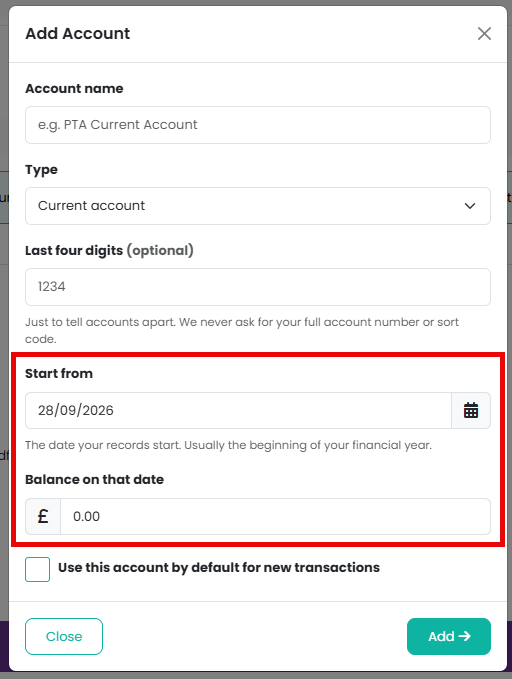
The opening balance is the agreed starting position for an account: what it held on the day you want your records to begin. You set it when you add the account, as Start from and Balance on that date.
Why can I not record a transaction before that date?
Everything that happened before the start date is already counted inside that one figure, so recording an earlier transaction would count the same money twice.
If the date is right and the balance is wrong, change the opening balance on the account rather than adding a transaction before it. Go to Finances > Bank Accounts, choose Edit on the account, and change Balance on that date.
Where does the opening balance appear?
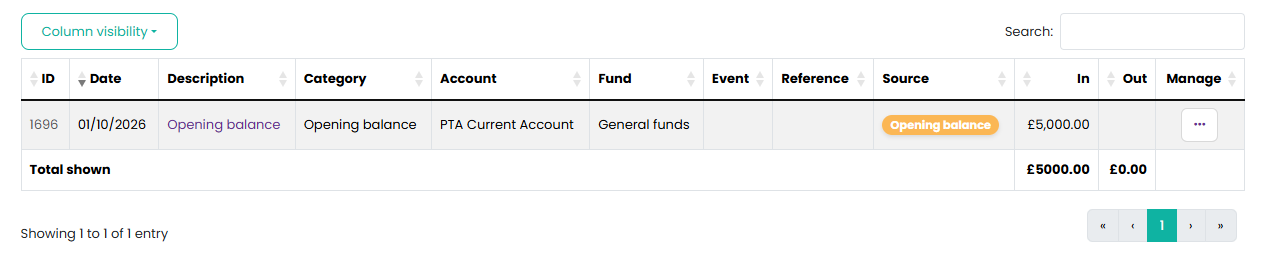
It shows as a transaction with the source "Opening balance" under Finances > Transactions. Its date and amount are set on the account, so you change them there rather than on the transaction.
Some of the money at the start date was restricted. How do I show that?
The opening balance lands in your default fund. If all of it belonged to one other fund, edit the opening balance transaction under Finances > Transactions and change its fund. If it was split, leave it in the general fund and use Move Money Between Funds under Finances > Funds, dated on the start date, to move the restricted part across. Either way your fund balances then agree with your account balances on day one.
Why can I not match an opening balance during reconciliation?
Because it is not money crossing your bank. It is the position you started from, already included in the bank's own opening figure, so it is left out of matching.
Related reading
Was this article helpful?
That’s Great!
Thank you for your feedback
Sorry! We couldn't be helpful
Thank you for your feedback
Feedback sent
We appreciate your effort and will try to fix the article