Short URLs are a simple and effective way to share web addresses. Within your event management menu, you can create a short URL for any event and distribute it easily to your community.
Please note: All short URLs use the pta.events domain.
How to create a short URL
Go to Admin > Events.
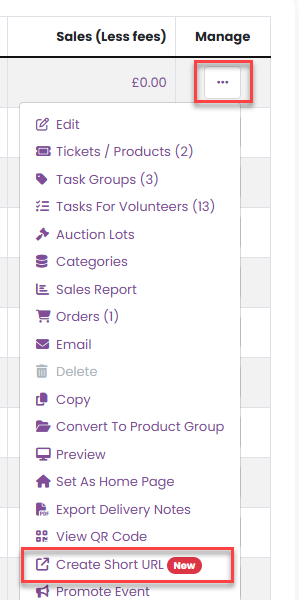
Locate the relevant event and open the Manage menu.
Select Create Short URL.
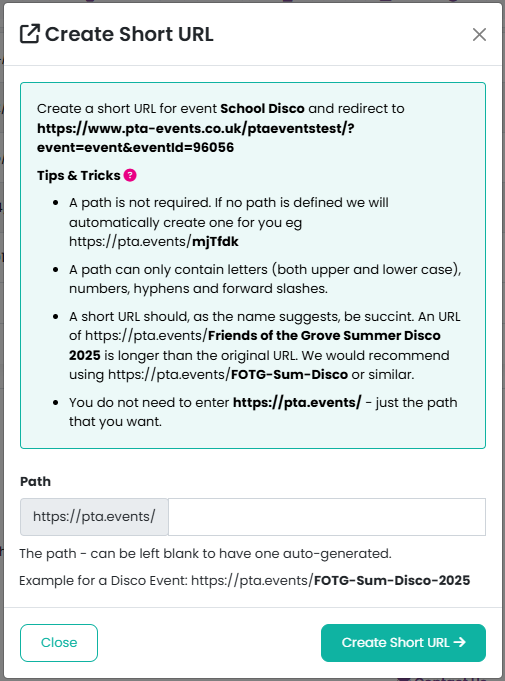
A modal window will appear, giving you two options:
Create your own custom URL, or
Generate one automatically, which will consist of a short combination of letters and numbers.
For example, you could create a short URL such as:
pta.events/thegroveptadisco
This would redirect visitors directly to your disco event page.
URL rules
The path may only include:
Upper and lower-case letters
Numbers
Hyphens
Forward slashes
If you leave the path blank, a short URL will be generated automatically for you.
Once you’re happy with your choice, click Create Short URL to finish.
Important: Short URLs cannot currently be edited or deleted once created. This functionality will be available in a future update.
Was this article helpful?
That’s Great!
Thank you for your feedback
Sorry! We couldn't be helpful
Thank you for your feedback
Feedback sent
We appreciate your effort and will try to fix the article