This information can be viewed from your Customers report where there will be icons visible in the 2FA column:
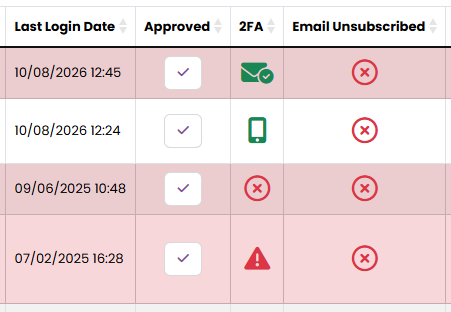
The green mobile phone icon indicates that 2FA has been enabled via the authenticator app.
The green envelope icon indicates that 2FA has been enabled via email.
The red cross in a circle icon indicates that 2FA has not been enabled but this customer does not have access to any elevated data.
The red emergency triangle icon indicates that 2FA has not been enabled but the customer has elevated access and therefore should look to enable it.
Elevated access is defined as customers with role-based access and/or those defined as event organisers.
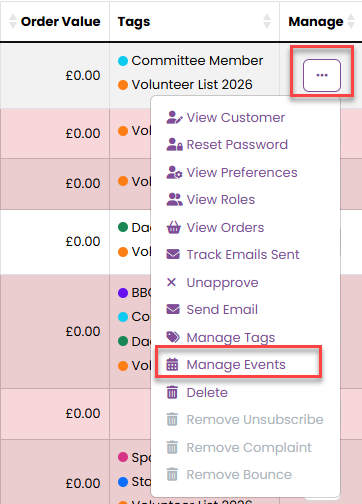
If you would like to remove a customer from having access to information relating to an event, you can remove their event organiser access by searching for them in the Customers report and selecting Manage Events from the Manage menu:
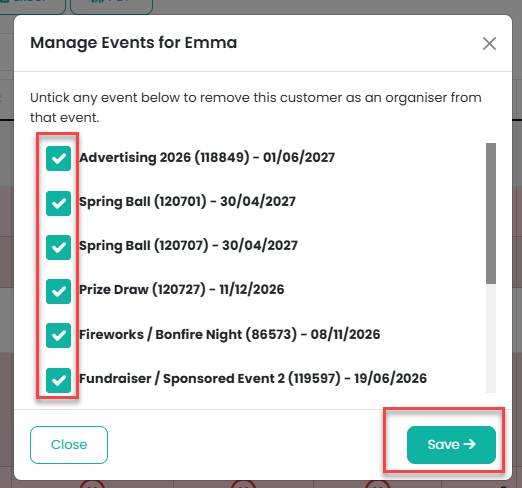
You will then be presented with a list of all the events they are an organiser for, and if you untick the events and click on the Save button, their access will be removed from these events:
Was this article helpful?
That’s Great!
Thank you for your feedback
Sorry! We couldn't be helpful
Thank you for your feedback
Feedback sent
We appreciate your effort and will try to fix the article