Normally, if you refund just some of the items on an order line - for example, 1 ticket out of 3 bought together - the stock for that item does not come back automatically. You have to go in and increase the product's stock quantity by hand to make the refunded unit available for sale again.
If you'd rather this happened automatically, you can turn on a setting that puts partially-refunded units straight back into stock, with no manual step needed.
What this setting changes
Once switched on, any time you issue a partial refund on part of an order line, that quantity is automatically taken off the "sold" count and made available for sale again - on the event, shop or product listing, in the basket, and in your sales reports.
This only affects partial refunds on part of a line. A full refund, or a refund of an entire line, already returns stock automatically - that behaviour does not change.
How to turn it on
- Log in and head to Admin.
- Go to Settings, then open the Basic Details tab.
- Find Return partially-refunded units to stock automatically in the Platform Details section, and tick the checkbox.
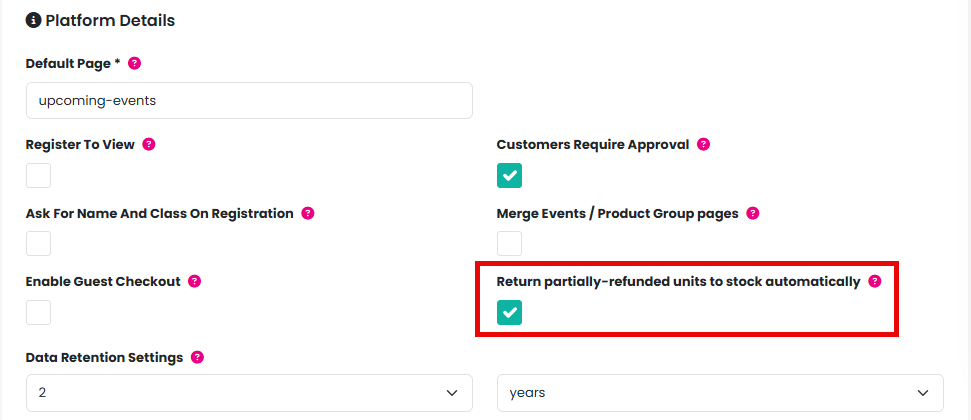
4. Scroll down and click Save.
New organisations have this switched on by default. If your organisation was set up before this option existed, it will be switched off until you turn it on.
Before you turn it on
If you've been used to manually topping up stock quantities after a partial refund, check your current stock levels before switching this on. Turning it on applies to all your existing partial refunds straight away, not just future ones - so if you've already compensated for a partial refund by hand, you could end up with that unit counted as available twice.
Was this article helpful?
That’s Great!
Thank you for your feedback
Sorry! We couldn't be helpful
Thank you for your feedback
Feedback sent
We appreciate your effort and will try to fix the article