Sometimes money needs to move from one fund to another: general funds topping up an appeal that has overspent, or the balance of a finished restricted fund being released. This is recorded as a transfer, not as a payment from one fund and a receipt into the other.
That distinction matters for your accounts. A fund transfer is not income or expenditure, because nothing came in and nothing went out. Recording it as a payment and a receipt would wrongly inflate both your total receipts and your total payments at year end.
How do I move money?
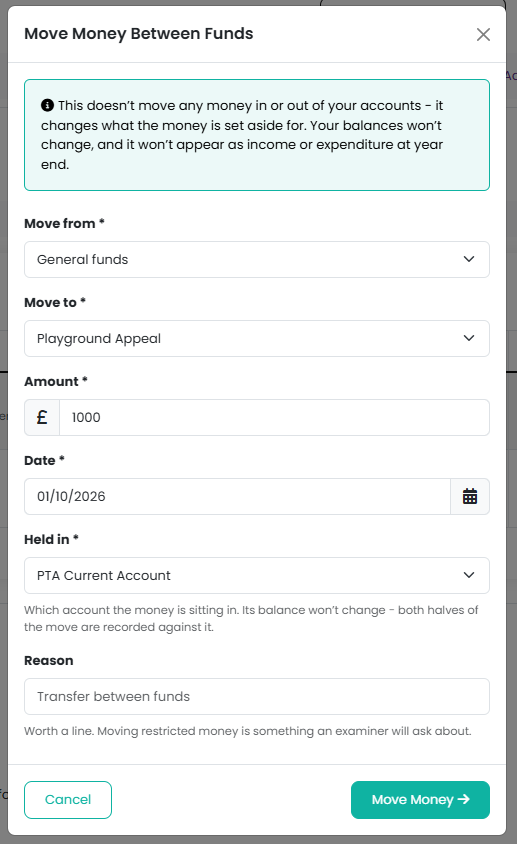
- Go to Finances > Funds
- Open the Manage menu and choose Move Money Between Funds
- Choose Move from and Move to
- Choose Held in, the account the money sits in. The money does not leave the account; only which fund it belongs to changes.
- Enter the Amount and Date
- Add a Reason and click on the Move Money button to confirm
Why am I asked for a reason?
The reason is optional for most transfers, but it is required when you move money out of a restricted or endowment fund. That money was given for a stated purpose, so moving it normally needs the donor's agreement or the Charity Commission's, unless the original purpose has been met or can no longer be carried out. Say which applies, so it is on record when your accounts are examined.
Can I move more than the fund holds?
No. You cannot move more out of a fund than it currently holds. You can move money into a fund that has gone below zero, which is how an overspend is normally put right.
Where does a transfer show up?
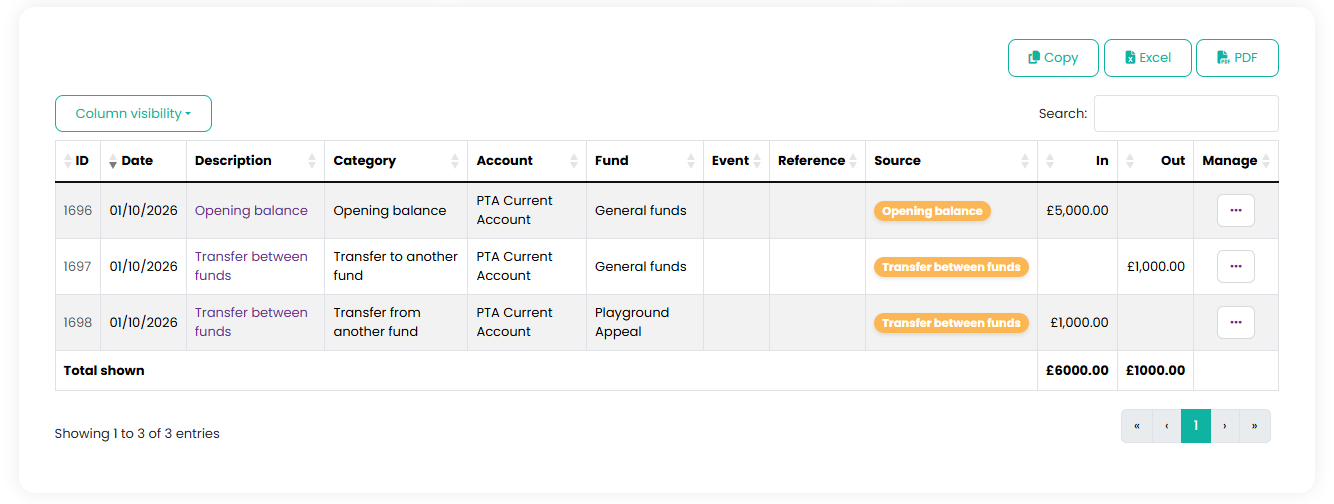
As a pair of transactions under Finances > Transactions, one out of the first fund and one into the second, with the source Transfer between funds. On your year-end accounts they appear on the transfers line and always add up to zero across the fund columns.
I recorded a transfer by mistake
Go to Finances > Transactions, find either half of the transfer and choose Delete from its menu. Both halves are removed together, so your funds keep balancing. Then record the transfer again. A transfer cannot be deleted once its financial year has been closed; reopen the year first if it really has to change.
Did the money actually move?
Moving money between funds changes what the money is set aside for, not where it sits. If you have moved money from one bank account to another, or between the bank and your cash tin, use Move Money Between Accounts under Finances > Bank Accounts instead. Using the wrong one puts a figure on your year end accounts that should not be there.
Note: fund transfers are left out of bank reconciliation, because the money never crossed your bank.
Related reading
Was this article helpful?
That’s Great!
Thank you for your feedback
Sorry! We couldn't be helpful
Thank you for your feedback
Feedback sent
We appreciate your effort and will try to fix the article