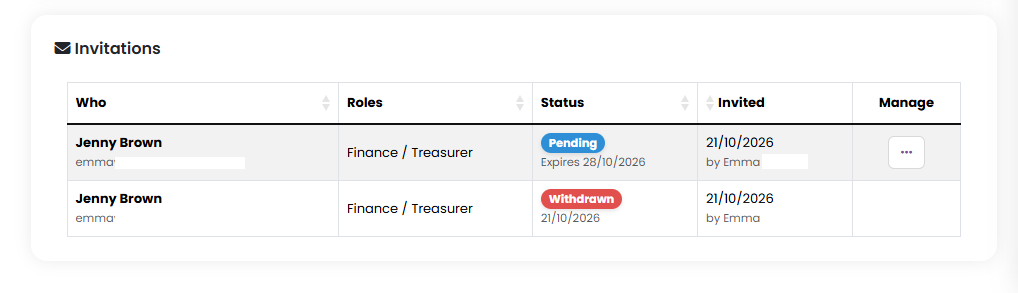
Every invitation you send is listed at the bottom of the invitations page (Settings > Customer Roles > Invite them) with its status, so you can see at a glance who has accepted and who still needs a nudge. Click on the 'Invite them' or 'X invitation' waiting link to view this:

What the statuses mean
- Pending - sent and waiting. The date it expires is shown underneath, along with how many times it has been sent if more than once.
- Accepted - the person used the link, either to set up a new account or to log in to one they already had. Their roles are in place.
- Expired - 7 days passed without the link being used. You can re-send it.
- Withdrawn - you cancelled it. The link no longer works.
Re-sending an invitation
- Find the invitation in the list and click the ... button in its Manage column.
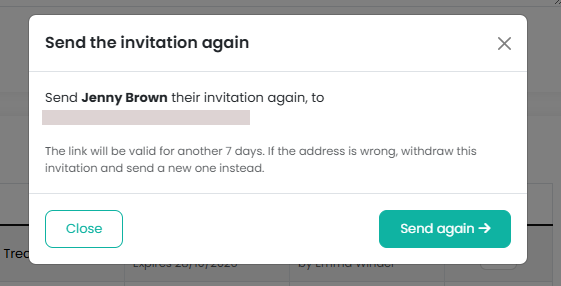
- Click Re-send, check the name and email address in the box that appears, and confirm.
The same link is sent again and is valid for another 7 days - the earlier email still works too. Each invitation can be sent five times in all, and re-sends count towards your 50 invitation emails a day; after that, check the email address with the person, and if it is wrong, withdraw the invitation and send a new one.
If you fill in the invitation form for an email address that already has an invitation waiting, it is re-sent rather than duplicated, so there is never more than one open invitation for an address.
Withdrawing an invitation
- Click the ... button in the invitation's Manage column.
- Click Withdraw and confirm.
The link in their email stops working straight away. The invitation stays in your list as Withdrawn so there is a record that the person was asked, and you can send a new one at any time.
Can I withdraw an invitation that has been accepted?
No. Once accepted, the roles are on the person's account, and taking them away is a separate step. Click ... next to the accepted invitation, choose Set Roles, untick what they should no longer have and click Update Customer Roles.
The email did not arrive
Ask the person to check their junk folder - the email comes from your organisation's own address. If it is not there, re-send it from the list. If the page told you the email could not be sent when you created the invitation, wait a few minutes and re-send it; the invitation itself was saved.
Related reading
Was this article helpful?
That’s Great!
Thank you for your feedback
Sorry! We couldn't be helpful
Thank you for your feedback
Feedback sent
We appreciate your effort and will try to fix the article