If your time on the PTA has come to an end and you are looking to handover the baton, then here are a few things for you to consider:
1. Website Admin Rights and Roles
Once new PTA or organisation members have been appointed, ensure they are all registered on the website. You can then assign the appropriate roles to each user. Please click here for further information.
If you would like to remain registered on the website but no longer act as an Administrator, there is no need to delete your account. Once a new Administrator has been assigned, you can simply remove your own Admin permissions:
Go to Admin > Settings > Roles
Uncheck the Administrator box (and any other roles you no longer hold)
Click Update
If you would prefer to be removed from the website entirely, go to My Account and click Exercise your right to erasure. Please ensure a new Administrator has been assigned before doing this.
2. Adding or Amending Classes
Before the new academic year begins, make sure all class lists are up to date. Follow the instructions in this FAQ to add or amend classes as needed.
3. Clearing and Managing Data
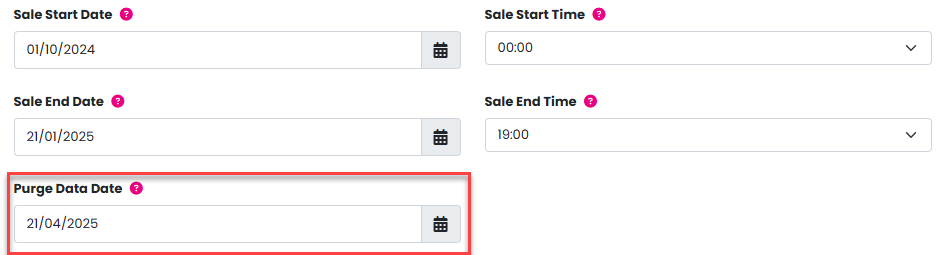
Review your archived events and product groups to ensure each has an appropriate Purge Data Date set. This ensures event-related data is not kept for longer than necessary. In most cases, there is no need to retain event data beyond the event itself.
If no purge date was set at the time of creation, it will automatically default to 90 days after the event end date or product group creation date.
To check or amend purge dates:
For current events: go to Admin > Events, then select Edit Event
For archived events: go to Admin > Events, click Show Archived Events, and select events by year
4. Committee members
If there are changes to your Committee, you can find full guidance on how to add, edit or delete Committee members in the FAQ here.
5. Advising your community
Would you like to inform your community about the changes, say goodbye and thank them, or share an update on your fundraising achievements? This FAQ explains how to send an email to all of your registered customers quicky and easily.
6. Website Training and Support
Helping the new team get up to speed will save them valuable time. Make sure they know how to:
Create or copy events
Print volunteer reports
Upload meeting minutes
Also remind them how to access:
The support portal, with a wide range of FAQs and tutorial videos
The option to raise a support ticket for direct help
The PTA Events Facebook Community Support Forum, where they can connect with and learn from other fundraisers
7. Paperwork and Key Information
Spending time reviewing essential documents and details can be a real lifesaver for those taking over. Key items to cover include:
Accounts and banking details
Stripe account access. Stripe allows you to add multiple team members to assist with business operations if you registered for a sole trader (individual/sole proprietor) account, which is more secure than sharing personal login credentials.
Insurance and charity registration
HMRC and Gift Aid information
Lottery licences
Contact details for local businesses, advertisers, and sponsors
Social media account logins
Passwords and access credentials
Risk assessment templates and other core documents
8. Reviewing Previous Events
Looking back over the past couple of years can provide invaluable insight for the new team—especially if they include parents who are new to the PTA. Admins can view these by heading to Admin > Events and selecting Show Archived Events from the Manage menu.
Consider noting:
Events that worked particularly well (and those that didn’t)
Reliable suppliers or service providers
Trusted entertainers, DJs, or caterers
Parents or local businesses who offer services such as free or discounted printing
This knowledge can make future planning much easier.
9. So Long… Not Goodbye?
We hope you’ve enjoyed using your PTA Events website. If you’re leaving this PTA or organisation, we’d like to thank you for choosing us to support your fantastic fundraising efforts.
Please do spread the word—friends, colleagues, and other organisations can benefit from a FREE PTA Events website for non-profits, charities, or clubs (transaction fees apply). And if you’re ever involved with another organisation that could use our platform, we’d love to welcome you back!
Was this article helpful?
That’s Great!
Thank you for your feedback
Sorry! We couldn't be helpful
Thank you for your feedback
Feedback sent
We appreciate your effort and will try to fix the article