By default, the email address shown on your event page - and used as the organiser email in calendar invites - is your organisation's main contact email. If you'd like a particular event to show a different contact address instead, you can now set one just for that event.
How to set it
- Head to Admin > Events and click on the event name
- Go to the Location section of the event editor.
- Enter an address in the Contact Email field.
- Scroll down and click on the Update Event button.
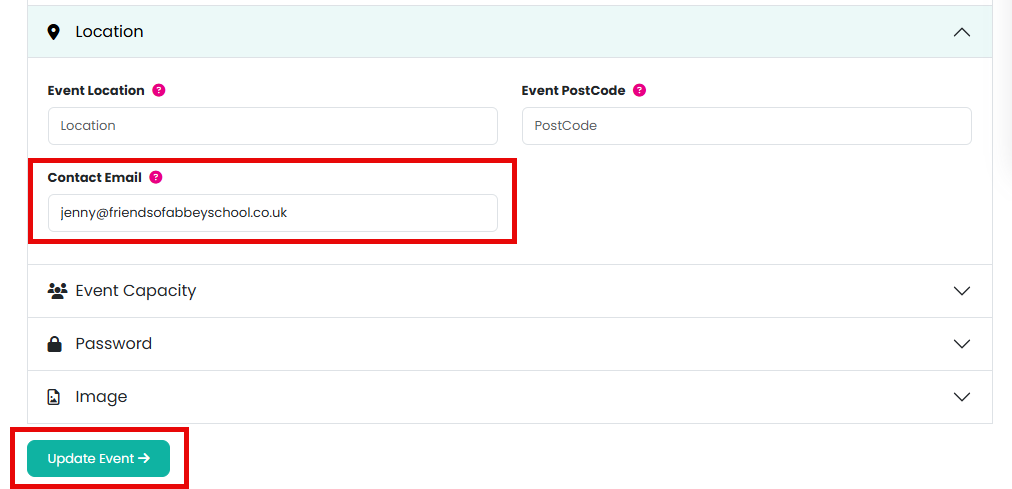
Leave this field blank to keep using your organisation's default contact email - nothing changes unless you fill it in.
Where this email is used
- It replaces your organisation's default contact email under Contact on the public event page.
- It's used as the organiser email in calendar invites for this event - including the calendar file attached to order confirmation emails, single-event calendar downloads, and your calendar subscription feed.
Note: this is separate from the order confirmation email text field further up the event editor, which lets you add a custom message to confirmation emails rather than change the contact address.
Related articles
Was this article helpful?
That’s Great!
Thank you for your feedback
Sorry! We couldn't be helpful
Thank you for your feedback
Feedback sent
We appreciate your effort and will try to fix the article