Record everything that is not a card payment taken through PTA Events: cash from events, cheques, bank transfers, grants, and everything your organisation spends. Card takings post themselves.
How do I record one?
- Go to Finances > Transactions
- Open the Manage menu and choose Add Transaction
- Fill in the details below and click on the Add button
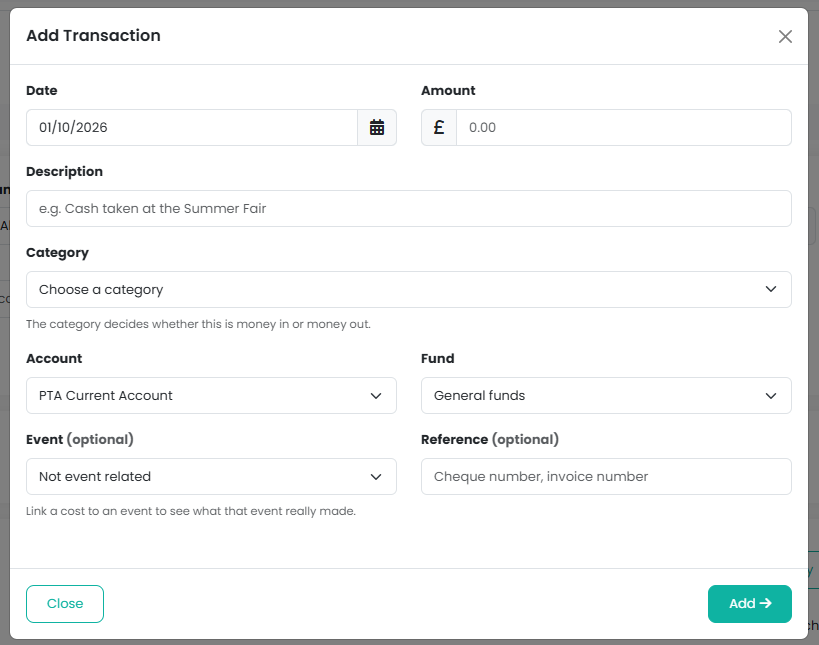
What do the fields mean?
- Date - when the money actually moved, not when it was promised.
- Amount - always a positive number. You never enter a minus figure; the category decides which way the money went. You can paste straight off a statement, including a currency symbol and commas.
- Description - what it was, in your own words.
- Reference - optional. A cheque number, invoice number or bank reference.
- Category - what the money was for: a donation, ticket sales, insurance, prizes. Categories become the lines on your year-end accounts.
- Account - where the money physically sits: your current account, savings account or cash tin.
- Fund - what the money may be spent on. Restricted money goes in its restricted fund; everything else in your general fund.
- Event - optional. Linking a cost or a cash receipt to an event lets you see what the event really made rather than just what it took.
What if one payment covers more than one thing?
Cash banked from three events, or one shop that was part raffle prizes and part refreshments, is one amount at the bank but several things in your accounts. Enter the total in Amount, choose Split this transaction and add a line for each part, with its own category, fund, event and amount. The lines have to add up to the total, and the running total shows you how much is still unallocated.
One transaction is recorded for each line. When the payment appears on your bank statement, choose Match to my records and tick all of them; together they match the single bank line.
Note: every line has to be the same way round, all money in or all money out. If a deposit was takings less something paid out of the tin, record the takings and the payment as two separate transactions.
Can I attach the receipt?
Yes, as you record it. Under Receipt or invoice at the bottom of the form, choose a photo or a PDF of up to 12 MB. For an invoice with several pages, a scanned PDF is one file; otherwise choose Add another page and attach a photo per page in one go. If you split the transaction, the receipt is attached to every line of the split, so you only attach it once.
You can also attach one later, or add more. Choose Receipts from the transaction's Manage menu. A transaction can hold up to ten files. A paperclip beside the description shows which transactions have a receipt, and the receipts go into the Examiner Pack for the year.
What should I not record as a transaction?
Money moved between your own accounts. Putting money into savings, drawing out floats or banking cash is not a receipt or a payment, and recording it as one would overstate both totals on your year end accounts. Use Move Money Between Accounts under Finances > Bank Accounts instead, which records both sides together.
Things that stop a transaction being saved
- A date before the account's start date. Everything before that is already inside the opening balance.
- A date inside a financial year you have closed. Reopen the year first if it really belongs there.
- A closed account, fund or category.
Related reading
Was this article helpful?
That’s Great!
Thank you for your feedback
Sorry! We couldn't be helpful
Thank you for your feedback
Feedback sent
We appreciate your effort and will try to fix the article