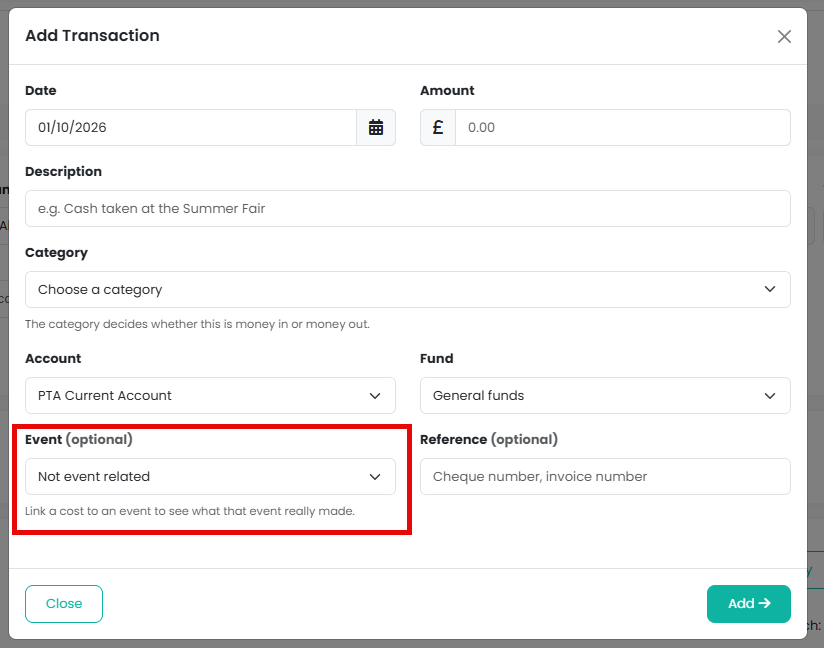
Every transaction has an optional Event field. Linking the costs of the summer fair to the summer fair means the money you spent sits against the money it took, so you can see what the event actually made rather than what it grossed.
How do I link a transaction to an event?
When you record or edit a transaction under Finances > Transactions, choose the event in the Event field. Expense claims can be linked to an event too, by the treasurer when the claim is approved.
What if one payment or deposit covers several events?
A transaction is linked to one event. For a deposit of cash from three events, or one shop bought for two, choose Split this transaction and add a line for each event. You can do this when you record the transaction or later, by editing it. One transaction is recorded per line, each linked to its own event, and together they match the single line on your bank statement. Expense claims can be split the same way when they are approved.
How do I see what an event made?
Go to Finances > Event Profit. It lists every event with what it took, what it cost and what it made, for a financial year or for all dates, and totals them. Choose an event's name to open its transactions, where you can export them with Copy, Excel or PDF, or recode any that are wrong. The Not linked to an event figure at the foot is everything with no event; check it for costs you forgot to link.
You can also filter the Transactions list by event directly, with the Event filter at the top of the page.
Note: card takings posted from a payout are linked to the event the tickets or products were sold on, and so is each event's share of the card processing and platform fees, so an event's card income and its fees are already in its figures. You only need to link the other costs.
Related reading
Was this article helpful?
That’s Great!
Thank you for your feedback
Sorry! We couldn't be helpful
Thank you for your feedback
Feedback sent
We appreciate your effort and will try to fix the article