Desktop View:
Mobile View:
Events are only displayed on the Events & Tickets page while they are active. An event is considered active when the current date falls between the event’s start and end dates.
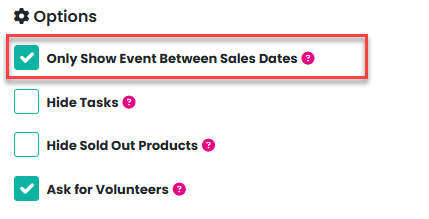
If you would like to remove an event from this page, you can enable the Only Show Event Between Sales Dates checkbox on the event setup page. This will control the visibility of the event based on its sales dates rather than its event dates.
Why are tickets or products still available if the event isn’t visible?
Tickets and products may still be available for purchase even if the event itself is not shown on the Events & Tickets page. This happens because tickets and products are displayed for sale based on their sales start and sales end dates.
To remove all tickets and products from sale, update the sales start and end dates so that they fall outside the current date.
Important note about ticket and product sales dates
If you have set individual sales start and end dates for specific tickets or products, these will override the event-level sales dates. In this case, you will need to update the sales dates for each ticket or product individually to stop them from being available for sale.
Was this article helpful?
That’s Great!
Thank you for your feedback
Sorry! We couldn't be helpful
Thank you for your feedback
Feedback sent
We appreciate your effort and will try to fix the article